First Web Crawler
Develop your first web crawler in Python Scrapy
The scraping series will not get completed without discussing Scrapy. In this post I am going to write a web crawler that will scrape data from OLX’s Electronics & Appliances’ items. Before I get into the code, how about having a brief intro of Scrapy itself?
What is Scrapy?
From Wikipedia:
Scrapy (/ˈskreɪpi/ skray-pee)[1] is a free and open source web crawling framework, written in Python. Originally designed for web scraping, it can also be used to extract data using APIs or as a general purpose web crawler.[2] It is currently maintained by Scrapinghub Ltd., a web scraping development and services company.
A
web crawling framework which has done all the heavy lifting that is
needed to write a crawler. What are those things, I will explore further
below.
Read on!
Creating Project
Scrapy introduces the idea of a project with multiple crawlers or spiders in
a single project. This concept is helpful specially if you are writing
multiple crawlers of different sections of a site or sub-domains of a
site. So, first create the project
Adnans-MBP:ScrapyCrawlers AdnanAhmad$ scrapy startproject olx
New Scrapy project 'olx', using template directory '//anaconda/lib/python2.7/site-packages/scrapy/templates/project', created in:
    /Development/PetProjects/ScrapyCrawlers/olx

You can start your first spider with:
    cd olx
    scrapy genspider example example.com
Creating Crawler
I ran the command
scrapy startproject olx which will create a project with name olx and
helpful information for next steps. You go to the newly created folder
and then execute command for generating first spider with name and the
domain of the site to be crawled:Adnans-MBP:ScrapyCrawlers AdnanAhmad$ cd olx/ Adnans-MBP:olx AdnanAhmad$ scrapy genspider electronics www.olx.com.pk Created spider 'electronics' using template 'basic' in module: olx.spiders.electronics
I generated the code of my first Spider with name electronics,
since I am accessing the electronics section of OLX I named it like
that, you can name it to anything you want or dedicate your first spider
to your spouse or (girl|boy)friend :>
The final project structure will be something like given below:
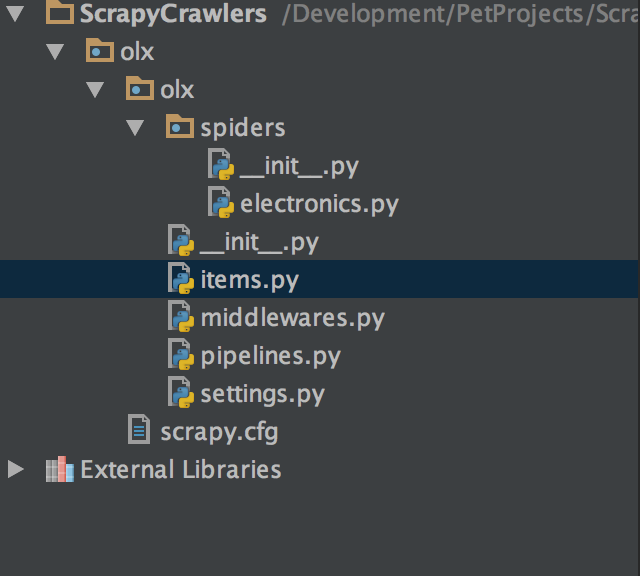
As
you can see, there is a separate folder only for Spiders, as mentioned,
you can add multiple spiders with in a single project. Let’s open
electronics.py spider file. When you open it, you will find something like that:# -*- coding: utf-8 -*-
import scrapy
class ElectronicsSpider(scrapy.Spider):
name = "electronics"
allowed_domains = ["www.olx.com.pk"]
start_urls = ['http://www.olx.com.pk/']
def parse(self, response):
pass
As you can see,
ElectronicsSpider is subclass of scrapy.Spider. The name
property is actually name of the spider which was given in the spider
generation command. This name will help while running the crawler
itself. The allowed_domains property tells which domains are accessible for this crawler and strart_urls
is the place to mention initial URLs that to be accessed at first
place. Beside file structure this is a good feature to draw the
boundaries of your crawler.
The
parse
method, as the name suggests that to parse the content of the page
being accessed. Since I am going to write a crawler that goes to
multiple pages, I am going to make a few changes.from scrapy.spiders import CrawlSpider, Rule
from scrapy.linkextractors import LinkExtractor
class ElectronicsSpider(CrawlSpider):
name = "electronics"
allowed_domains = ["www.olx.com.pk"]
start_urls = [
'https://www.olx.com.pk/computers-accessories/',
'https://www.olx.com.pk/tv-video-audio/',
'https://www.olx.com.pk/games-entertainment/'
]
rules = (
Rule(LinkExtractor(allow=(), restrict_css=('.pageNextPrev',)),
callback="parse_item",
follow=True),)
def parse_item(self, response):
print('Processing..' + response.url)
In
order to make the crawler navigate to many page, I rather subclassed my
Crawler from Crawler instead of scrapy.Spider. This class makes
crawling many pages of a site easier. You can do similar with the
generated code but you’ll need to take care of recursion to navigate
next pages.
The
next is to set rules variable, here you mention the rules of navigating
the site. The LinkExtractor actually takes parameters to draw
navigation boundaries. Here I am using restrict_css parameter to set the
class for NEXT page. If you go to this page and inspect element you can find something like this:

pageNextPrev is the class that be used to fetch link of next pages. The call_back parameter tells which method to use to access the page elements. We will work on this method soon.
Do remember, you need to change name of the method from
parse() to parse_item() or whatever to avoid overriding the base class otherwise your rule will not work even if you set follow=True.
So far so good, let’s test the crawler I have done so far. Again, go to terminal and write:
Adnans-MBP:olx AdnanAhmad$ scrapy crawl electronics
The 3rd parameter is actually the name of the spider which was set earlier in the
name property of ElectronicsSpiders
class. On console you find lots of useful information that is helpful
to debug your crawler. You can disable the debugger if you don’t want to
see debugging information. The command will be similar with --nolog switch.Adnans-MBP:olx AdnanAhmad$ scrapy crawl --nolog electronics
If you run now it will print something like:
Adnans-MBP:olx AdnanAhmad$ scrapy crawl --nolog  electronics
Processing..https://www.olx.com.pk/computers-accessories/?page=2
Processing..https://www.olx.com.pk/tv-video-audio/?page=2
Processing..https://www.olx.com.pk/games-entertainment/?page=2
Processing..https://www.olx.com.pk/computers-accessories/
Processing..https://www.olx.com.pk/tv-video-audio/
Processing..https://www.olx.com.pk/games-entertainment/
Processing..https://www.olx.com.pk/computers-accessories/?page=3
Processing..https://www.olx.com.pk/tv-video-audio/?page=3
Processing..https://www.olx.com.pk/games-entertainment/?page=3
Processing..https://www.olx.com.pk/computers-accessories/?page=4
Processing..https://www.olx.com.pk/tv-video-audio/?page=4
Processing..https://www.olx.com.pk/games-entertainment/?page=4
Processing..https://www.olx.com.pk/computers-accessories/?page=5
Processing..https://www.olx.com.pk/tv-video-audio/?page=5
Processing..https://www.olx.com.pk/games-entertainment/?page=5
Processing..https://www.olx.com.pk/computers-accessories/?page=6
Processing..https://www.olx.com.pk/tv-video-audio/?page=6
Processing..https://www.olx.com.pk/games-entertainment/?page=6
Processing..https://www.olx.com.pk/computers-accessories/?page=7
Processing..https://www.olx.com.pk/tv-video-audio/?page=7
Processing..https://www.olx.com.pk/games-entertainment/?page=7
Since I set
follow=True, the crawler will check rule for Next Page
and will keep navigating unless it hits the page where the rule does
not mean, usually the last Page of the listing. Now imagine if I am
going to write similar logic with the things mentioned here,
first I will have to write code to spawn multiple process, I will also
have to write code to navigate not only next page but also restrict my
script stay in boundaries by not accessing unwanted URLs, Scrapy takes
all this burder off my shoulder and makes me to stay focus on main logic
that is, writing the crawler to extract information.
Now I am going to write code that will fetch individual item links from listing pages. I am going to modify code in
parse_item method.item_links = response.css('.large > .detailsLink::attr(href)').extract()
for a in item_links:
yield scrapy.Request(a, callback=self.parse_detail_page)
Here I am fetching links by using
.css method of response. As I said, you can use xpath as well, up to you. In this case it is pretty simple:
The anchor link has a class
detailsLink, if I only use response.css('.detailsLink') then it’s going to pick duplicate links of a single entry due to repetition of link in img and h3 tags. What I did that I referred the parent class large as well to get unique links. I also used ::attr(href) to extract the href part that is link itself. I am then using extract() method. The reason to use is that .css and .xpath returns SelectorList object, extract() helps to return the actual DOM for further processing. Finally I am yielding links in scrapy.Request with a callback. I have not checked inner code of Scrapy but most probably they are using yield instead of a return because you can yield multiple items and since the crawler needs to take care of multiple links together then yield is the best choice here.
The
parse_detail_page method as the name tells is to parse individual information from the detail page. So what actually is happening is:- You get list of entries in
parse_item - Pass them on in a callback method for further processing.
Since
it was only a two level traverse I was able to reach lowest level with
help of two methods. If I was going to start crawling from main page
of OLX I would have to write 3 methods here; first two to fetch
subcategories and their entries and the last one for parsing the actual
information. Got my point?
Finally, I am going to parse the actual information which is available on one of the entries like this one.
Parsing
information from this page is not different but here’s something that
to be done to store parsed information. We need to define model for our data. It means we need to tell Scrapy what information do we want to store for later use. Let’s edit
item.py file which was generated earlier by Scrapy.import scrapy
class OlxItem(scrapy.Item):
# define the fields for your item here like:
# name = scrapy.Field()
pass
OlxItem is the class in which I will set required fields to hold information. I am going to define 3 fields for my model class.class OlxItem(scrapy.Item):
# define the fields for your item here like:
title = scrapy.Field()
price = scrapy.Field()
url = scrapy.Field()
I am going to store Title of the post, price and the URL itself. Let’s get back to crawler class and modify
parse_detail_page.
Now one method is to start writing code, test by running entire crawler
and get whether you’re on right track or not but there’s another
awesome tool provided by Scrapy.Scrapy Shell
Scrapy
Shell is a command line tool that provides you opportunity to test your
parsing code without running thee entire crawler. Unlike the crawler
which goes to all the links, Scrapy Shell save the DOM of an individual
page for data extraction. In my case I did following:
Adnans-MBP:olx AdnanAhmad$ scrapy shell https://www.olx.com.pk/item/asus-eee-pc-atom-dual-core-4cpus-beautiful-laptops-fresh-stock-IDUVo6B.html#4001329891
Now I can easily test code without hitting same URL again and again. I fetched the title by doing this:
In [8]: response.css('h1::text').extract()[0].strip()
Out[8]: u"Asus Eee PC Atom Dual-Core 4CPU's Beautiful Laptops fresh Stock"
You can find familiar
response.css here. Since entire DOM is available, you can play with it.
And I fetch price by doing this:
In [11]: response.css('.pricelabel > strong::text').extract()[0]
Out[11]: u'Rs 10,500'
No need to do anything for fetching url since
response.url returns the currently accessed URL.
Now all code is checked, it’s time to incorporate it in
parse_detail_page:title = response.css('h1::text').extract()[0].strip()
price = response.css('.pricelabel > strong::text').extract()[0]
item = OlxItem()
item['title'] = title
item['price'] = price
item['url'] = response.url
yield item
After parsing required information
OlxItem
instance is being created and properties are being set. So far so good,
now it’s time to run crawler and store information, there’s a slight
modification in command:scrapy crawl electronics -o data.csv -t csv
I
am passing file name and file format for saving data. Once run, it will
generate CSV for you. Easy, isn’t it? Unlike the crawler you are
writing on your own you gotta write your own routine for saving data but
wait! it does not end here, you can even get data in JSON format, all
you have to do is to pass
json with -t switch.
One
more thing, Scrapy provides you another feature, passing a fixed file
name does not make any sense in real world scenarios, how about I could
have some facility to generate unique file names? well, for that you
need to modify
settings.py file and add these two entries:FEED_URI = 'data/%(name)s/%(time)s.json' FEED_FORMAT = 'json'
Here I am giving pattern of my file,
%(name)% is name of crawler itself and time is timestamp. You may learn further about it here. Now when I run scrapy crawl --nolog electronics or scrapy crawl electronics it will generate a json file in data folder, something like this:[
{"url": "https://www.olx.com.pk/item/acer-ultra-slim-gaming-laptop-with-amd-fx-processor-3gb-dedicated-IDUQ1k9.html", "price": "Rs 42,000", "title": "Acer Ultra Slim Gaming Laptop with AMD FX Processor 3GB Dedicated"},
{"url": "https://www.olx.com.pk/item/saw-machine-IDUYww5.html", "price": "Rs 80,000", "title": "Saw Machine"},
{"url": "https://www.olx.com.pk/item/laptop-hp-probook-6570b-core-i-5-3rd-gen-IDUYejF.html", "price": "Rs 22,000", "title": "Laptop HP Probook 6570b Core i 5 3rd Gen"},
{"url": "https://www.olx.com.pk/item/zong-4g-could-mifi-anlock-all-sim-supported-IDUYedh.html", "price": "Rs 4,000", "title": "Zong 4g could mifi anlock all Sim supported"},
...
]
Conclusion
This was the last(most probably) post in the scraping series. I am planning to come up with some other technology in coming days. Stay tuned!
The code is available on Github
Comments
Post a Comment